| 1、
Introduction to project estimation based on use cases
Project estimation is one of the
most difficult tasks in software development, and
project estimation of a software project is a prediction
of the workload, time, and cost spent on the entire
software development process, such as requirements
analysis, design, coding, testing, and integration
delivery.
Project estimation is the basis
for making a reasonable project plan, and project
management is inseparable from the following major
issues: scope of work, time, cost, quality, resources
and risk. Faced with these problems, we need to make
a reasonable project estimate.
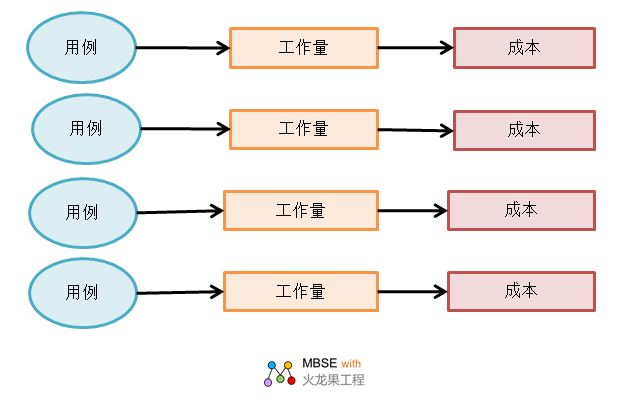
We can use use cases to describe
the functional requirements of the system, and the
main object of the project estimate is the functional
requirements. Project managers can estimate the effort,
time, and cost of a project based on use cases.
2、Use case estimation function
in the modeling tool EA
In the modeling tool EA, users
can build use case models, which are the basis for
use case estimation. The ability to estimate based
on a use case model is available in the EA. The Use
Case Estimation feature in EA can estimate the complexity
of the estimated project by estimating the effort,
time, cost, and more required to implement the project.
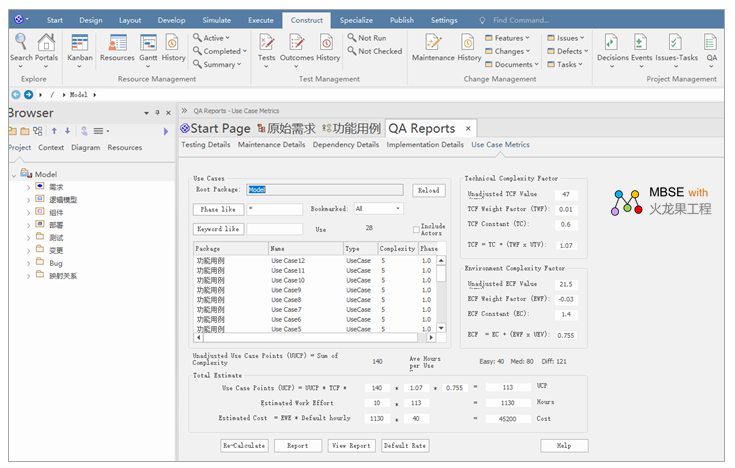
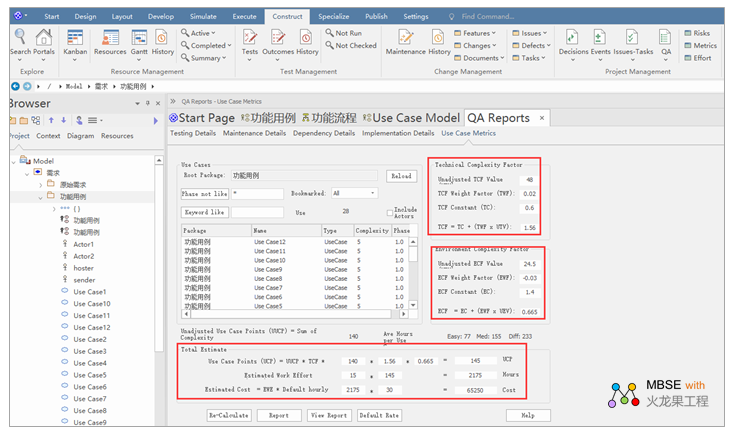
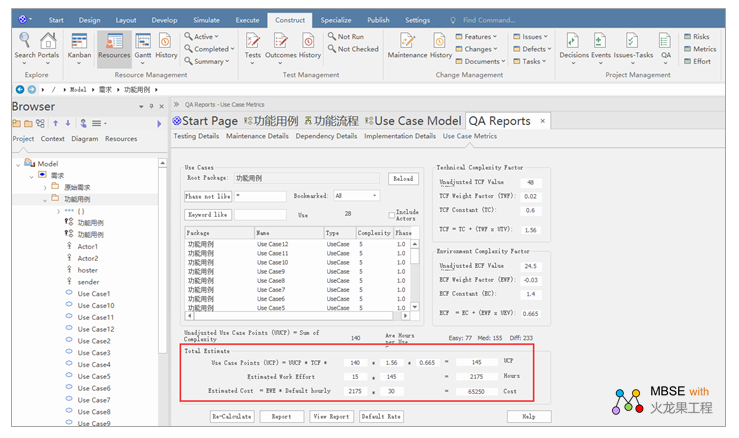
The following is a report of the
estimated effort of the use case project based on
the chat room model, which can reflect the projected
effort of the project, the estimated cost, the degree
of technical complexity factors, and the environmental
complexity factors.
2.1 How to turn on the use case
estimation function in the modeling tool EA
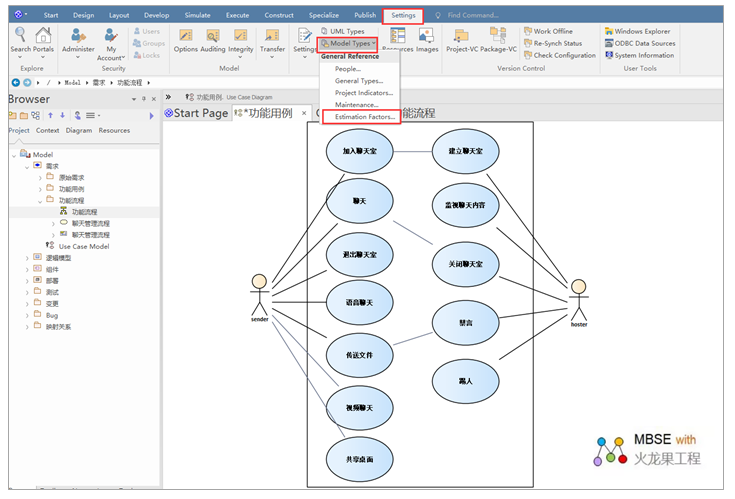
Open the method of use case estimation
in EA: Settings - Reference Data - Model Type ---
Estimation Factor. Here's how it looks:
2.2 What are the metrics for
use case estimation?
In EA, there are three types of use case estimation indicators:
• Technical complexity
metrics
• Environment complexity
indicator
• Labor hours metrics
Let's take a look at each of the
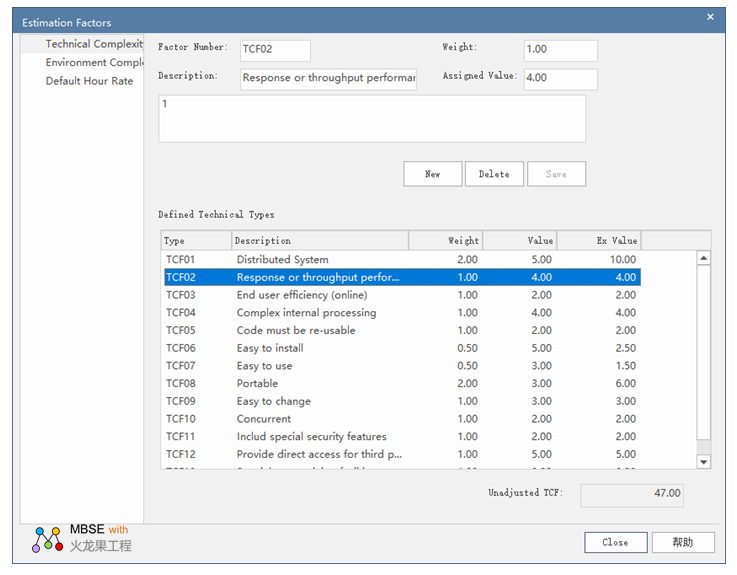
indicators. The interface view for defining the estimated
metrics for a use case is as follows:
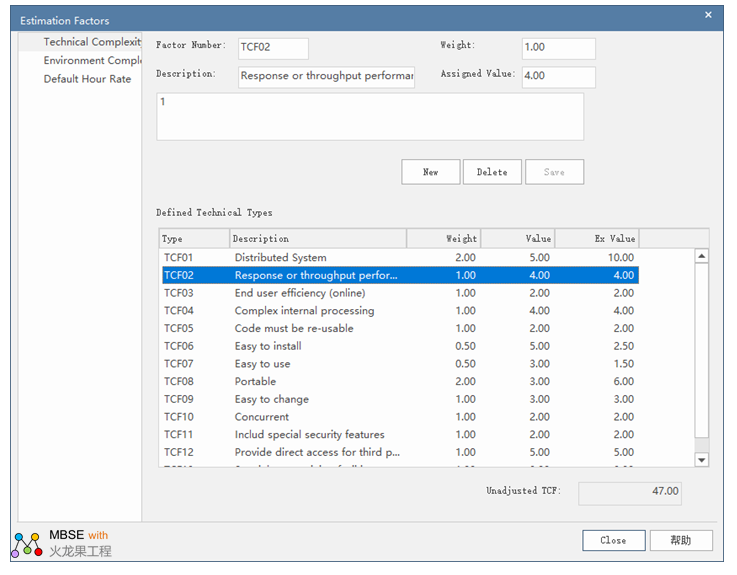
2.2.1 Technical Complexity Indicators
The abbreviation for Technical
Complexity Metric is TCF, and the sample model in
the EA contains a default set of Technical Complexity
Metrics (TCFs) that we can add or modify using the
Estimation Factor dialog. This set of metrics should
include all metrics that may affect the technical
complexity of the project environment.
Here are the technical complexity
indicators for instructions:
| Item |
illustrate |
| Factor Number |
Factor number |
| Description |
Illustrative information |
| Weight |
The importance of
technical complexity |
| Assigned Value |
Assignment value, which
indicates the degree to which the factor affects
the project |
| Unadjusted TCF |
The Unadjusted TCF
Value is combined with the technical complexity
factor to skew the overall complexity up or down
depending on the level of technical complexity
and the corresponding level of technical support. |
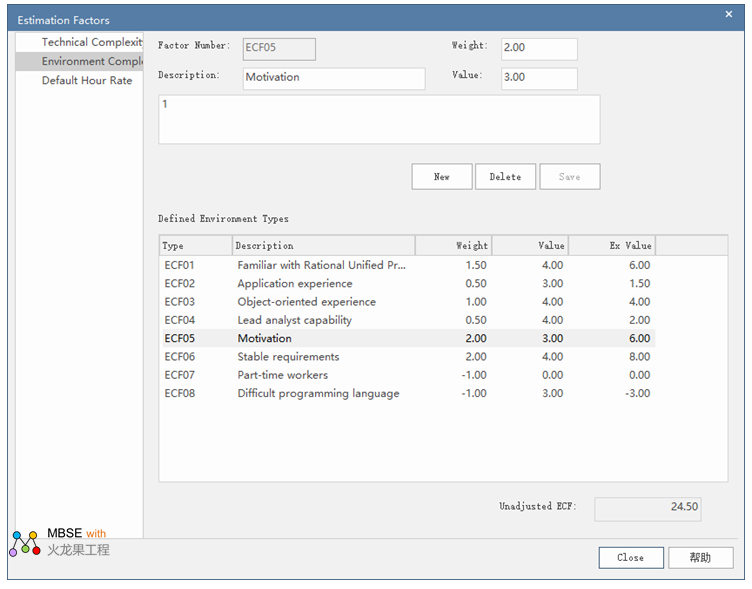
2.2.2 Environment complexity
indicator
The abbreviation for Environment
Complexity Indicator is ECF, and the sample model
in the EA contains a default set of Environment Complexity
Indicators (ECFs) that we can add or modify using
the Estimator dialog. This set of metrics should include
all metrics that may affect the general design and
development environment, including team experience
and knowledge, team size, expertise, and other non-functional
metrics.
Here are the descriptions of the
Environment Complexity Indicator:
| Item |
illustrate |
| Factor Number |
Factor number |
| Description |
Illustrative information |
| Weight |
The weight of the complexity
of the environment |
| Assigned Value |
Assignment value, which
indicates the degree to which the factor affects
the project |
| Unadjusted ECF |
The Unadjusted ECF
Value, combined with the technical complexity
metric, fine-tunes the overall complexity up or
down based on the level of technical complexity
and the corresponding level of environmental support.
|
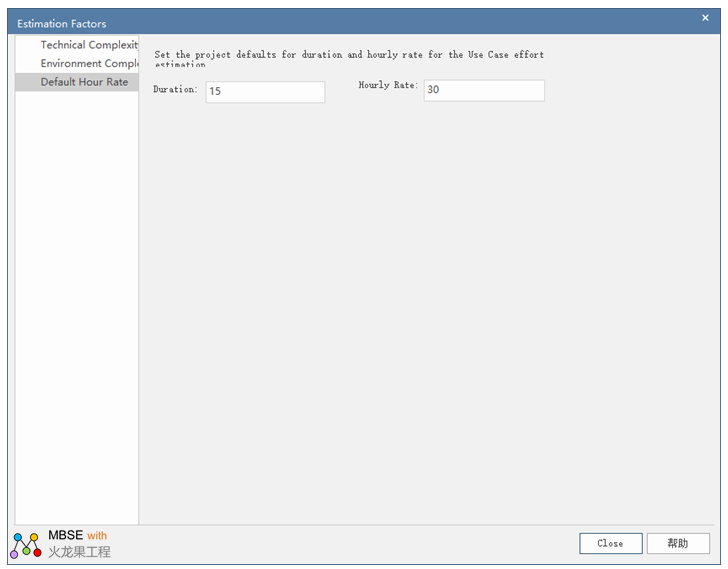
2.2.3 Hourly Rate Metrics
Setting an hourly rate is the
hardest metric in project estimation, and hourly rates
can range from 10 to 30 hours per project use case
point.
The best way to estimate an hourly
rate is to complete a project estimate in EA by appropriately
adjusting the values of the project duration and hourly
rate by analyzing previously completed projects.
The following are the relevant
metrics for the default hourly rate description:
Item
|
illustrate
|
| Set the project defaults
for duration and hourly rate for the Use Case
effort estimati on
|
Set the project default
duration and hourly rate for the use case effort
estimate
|
| Duration
|
Project duration
|
| Hourly Rate
|
Project hourly rate
|
2.3 Description of the use case-based
project sizing feature in EA
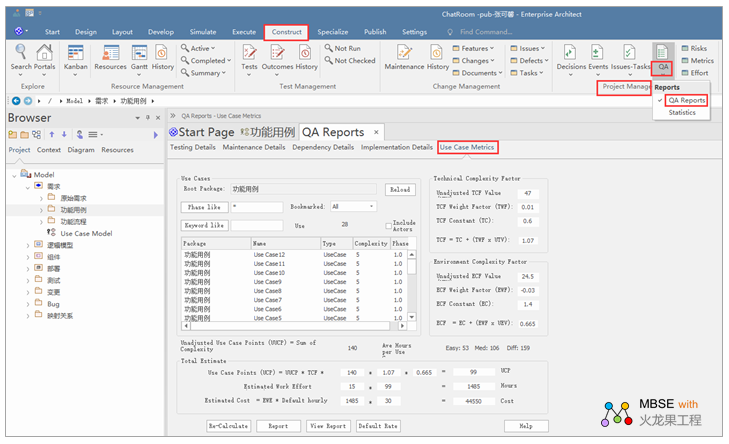
Project sizing is also available in EA, and the method of
entering project sizing is as follows: Select Build
- Project Management - QA - QA Report - Use Case Estimation,
the view is as follows:
Here's how it works:
| Project
|
Illustrate
|
| Root Package |
The root package, the
top-level package of the estimated content, all
use cases under this package may be included in
the report.
|
| Reload
|
Re-run the load from
the selected package, which is typically used
after changing the filter criteria.
|
| Phase like
|
Stage, which is used
to select the use cases that are in that stage.
|
| Keyword like
|
Keywords, which are
used to select use cases that have that keyword.
|
| Bookmarked
|
Bookmarked, including all use cases, or just marked
or untagged use cases:
 |
| Use Cases
|
Displays the total
number of use cases in the estimate.
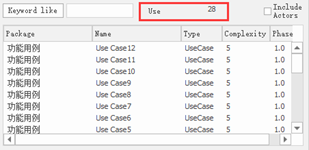
For example, the total number
of use cases in the chat room model is 28.
 |
| Include Actors
|
For included participants,
selecting this checkbox indicates that participants
are included in the estimate.
|
| Technical Complexity
Factor
|
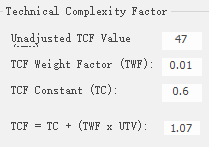
Technical Complexity
Factor, a parameter that describes the technical
complexity of a project, Unadjusted TCF Value
from the Technical Complexity Factor tab of the
Estimation Factors dialog box, which constitutes
the use case point method formula.
These fields need to be
modified carefully, and the final project estimate
is proportional to the TCF.
 |
| Environment Complexity
Factor-
|
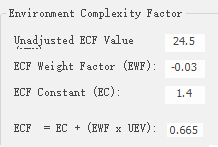
Environmental complexity
factor, a parameter that describes the level of
non-functional environmental complexity of a programmer's
experience, knowledge, or expertise. The Unadjusted
ECF Value comes from the Environment Complexity
Factors tab of the Estimators dialog box, and
it forms the use case point method formula.
The final project estimate
is also proportional to the ECF.
 |
| Unadjusted Use Case
Points (UUCP)
|
Unadjusted Use Case
Points (UUCP)
|
| Ave Hours per Use Case
|
Average hours per use
case, the average number of hours allocated to
easy, moderate, and hard use cases.
These numbers cannot be
changed.
 |
| Total Estimate
|
Total estimates, see
the details of the final estimates.
 |
| Default Rate
|
Default Ratio, which
sets the project duration and hourly rate for
the use case effort estimate
 Duration-
Duration: The duration of the project
Hourly Rate: The hourly
rate of the project |
| Re-Calculate
|
Recalculate, and the
estimate needs to be rerun after changing the
hours or use case points.
|
| Report
|
Reports, which generate
reports in rich text format based on current estimates.
|
| View Report
|
View the generated
report.
|
3 、Example of project estimation
based on use case
Below we illustrate how to use
use use cases for project estimation through the Chat
Room sample project. The following is a report of
the estimated effort for the use case project of the
Chat Room Model, which can show the estimated effort
of the project, the estimated cost, the degree of
technical complexity factor, and the degree of environmental
complexity factor. Here's how it looks:
In the estimation,
the ratio value of the corresponding indicator can
be adjusted according to the actual situation of the
project to make the estimation more accurate.
Here's how each of
the two metrics can be adjusted:
• Estimation
metrics in technical complexity and environmental
complexity
• The
value of the project duration and hourly rate.
3.1Adjust the impact of technical
complexity and environmental complexity factors on
project estimates
The following view shows the estimated effort of the project
calculated before adjusting the technical complexity
and environmental complexity estimation factor values.
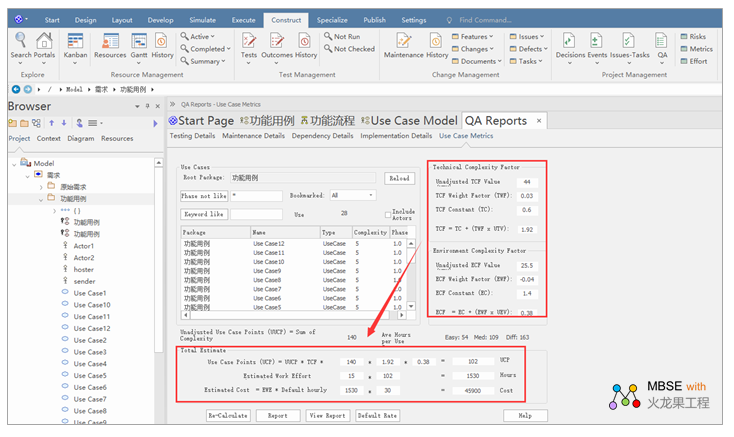
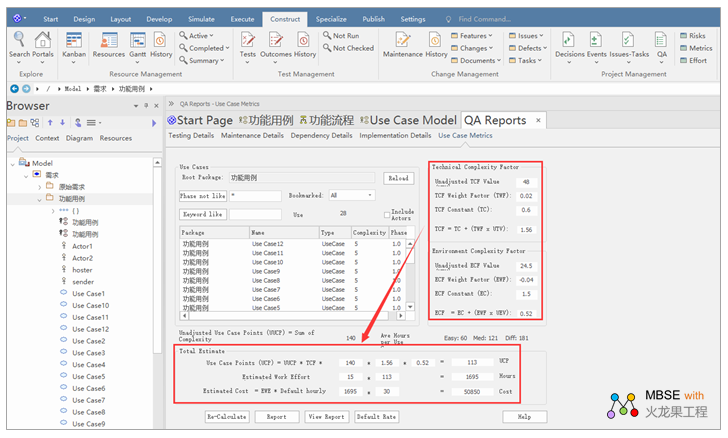
The following view shows the estimated
effort of the project calculated after adjusting the
technical complexity and environmental complexity
estimation factor values.
3.2 Adjust the impact of project
duration and hourly rates on project estimates
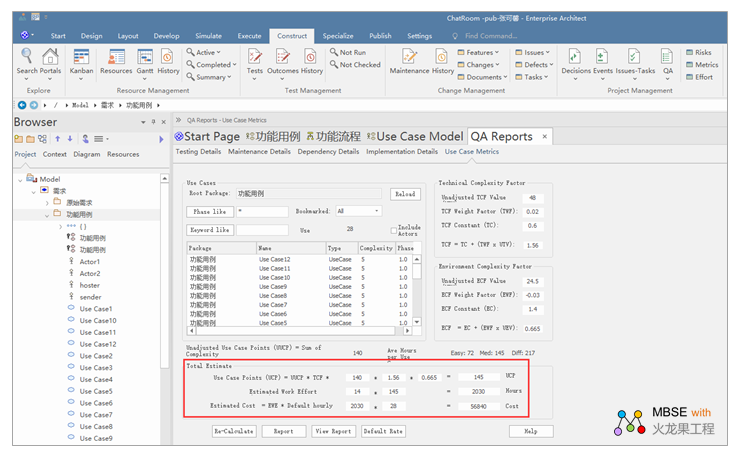
Let's adjust the values of Project
Duration and Hourly Rate from 14 to 15 and 28 to 30
for the Hourly Rate, and then click "Recalculate"
to get a different estimate for the project. Here's
how it looks:
Before project
duration and hourly rate adjustments
After adjustments
for project duration and hourly rates
Postscript
I hope you have benefited
from reading this.
If you are willing to share
your experience, please submit it to us.
If you are interested in
our training, consulting and tools:
Course:
Tool:
Consulting
Options:
If you would like to learn more:
|